Monday, 10 June 2013

color coading to sharepoint list columns with screen shots

SharePoint calculated column and jQuery Highlight row

Hi All,
Here I am writing new blog after long time I highly apologies to our all regular SharePointKings readers. I have explore what you can do by SharePoint calculated column and jQuery here is small practical stuff follow the instructions and do it yourself you will surely enjoy this work I am sure.
Sometimes you need to represent SharePoint List in terms of legend like in map. Say for example you have result list and you want to show those Student who got less than 35% marks Should Have “Red” Legend, those who got 100% marks with “Blue” Legend , those who got >65% with “Pink” Legend , those who got >70% with Yellow, marks > 60 with Green.

Follow the steps
1. Create Result SharePoint custom list
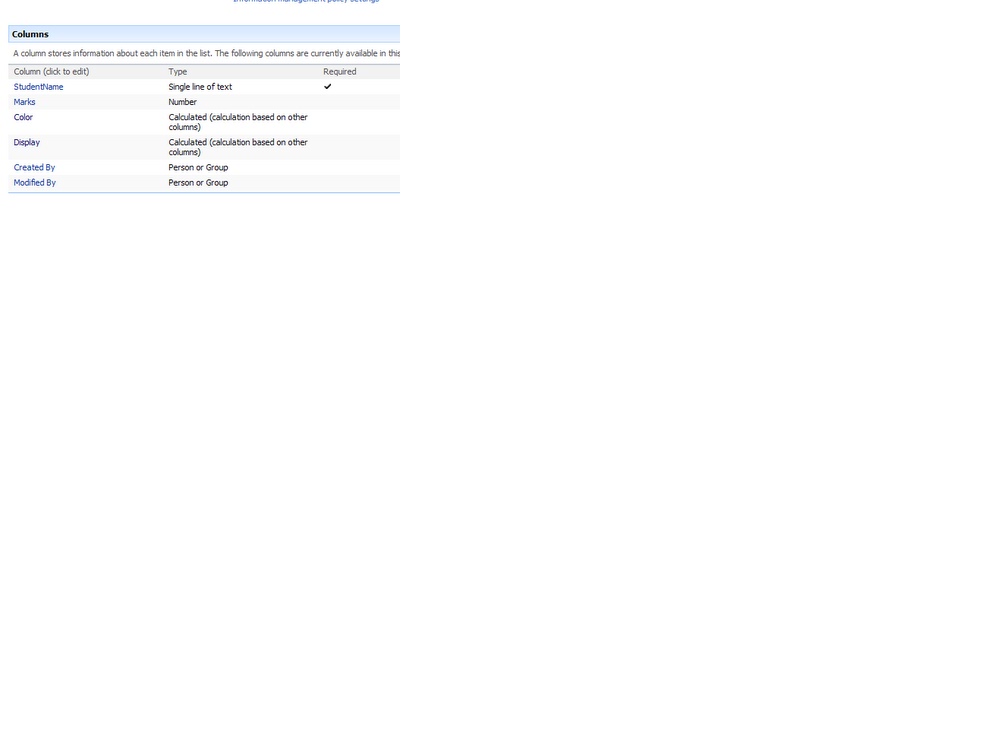
 2. Create column StudentName single line text.

3. Create Column Color with Calculated Column.
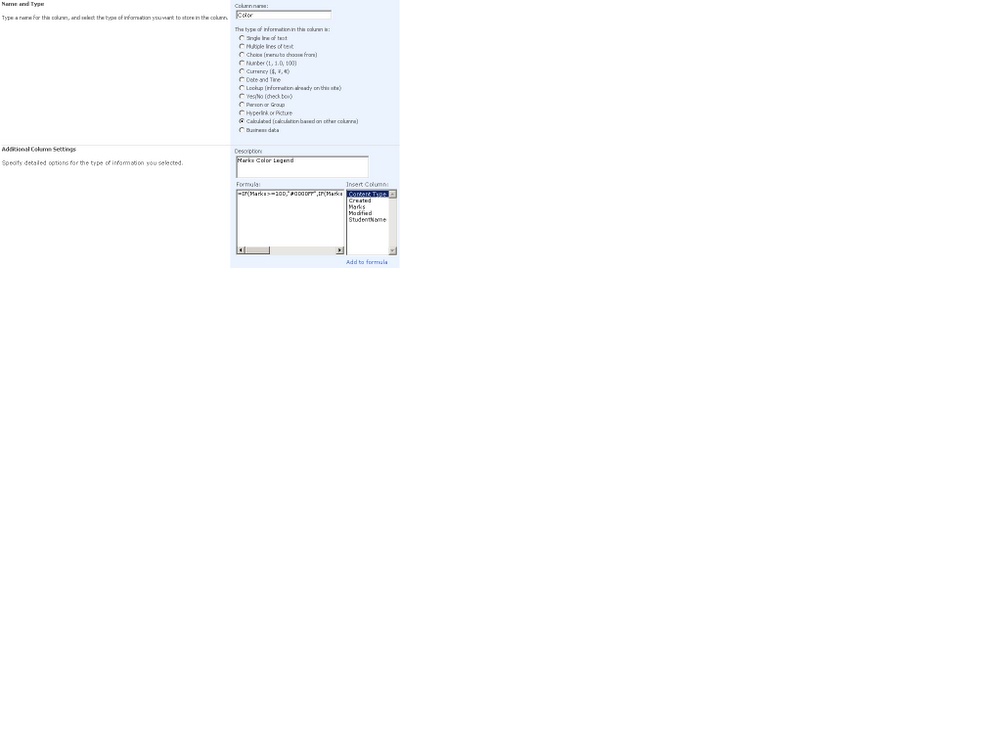
Copy and Paste following code in formula.
=IF((Marks*100)>=100,"#0000FF",IF((Marks*100)>=70,"#FFFF00",IF((Marks*100)>60,"#FF00FF",IF((Marks*100)>=35,"#00FF00","#FF0000"))))

4. Create another column called Display
Copy and paste following formula
="<DIV style='border: 1px "&Color&" solid;background-color:"&Color&";color:#FFFFFF;'>"&Marks*100&"<DIV>"

5. Now your fields looks like this
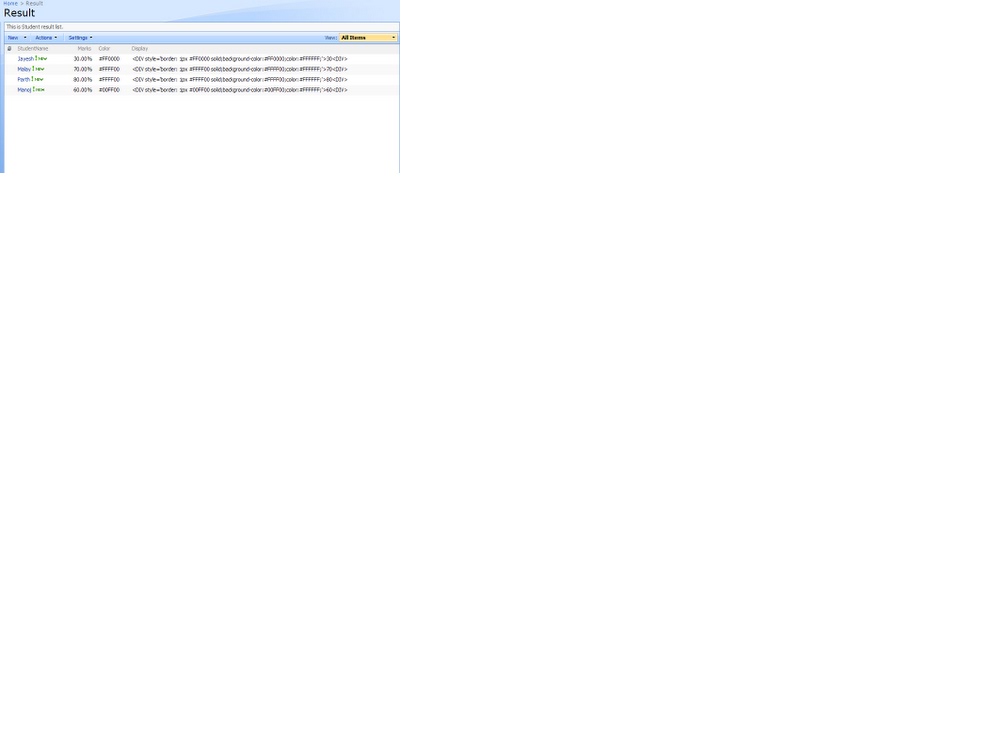
6. Open new form and Add Student Name and Marks obtained by him.
7. Once you enter marks for student your SharePoint list looks like this


8. Edit Page and add the below script in content editor webpart

<script src="/sites/testingsite/SiteAssets/jquery-1.9.0.min.js" type="text/javascript"></script><script type="text/javascript">


$(document).ready(function(){
$(".ms-vb2:contains('<DIV')").each(function(){
var tempDIV = document.createElement ("DIV");
tempDIV.style.cursor = "pointer";
tempDIV.innerHTML = $(this).text();
$(this).text("");
$(this).append(tempDIV);
});}); </script>


9) finally look like this


Color coading to sharepoint list column

Reference url:
http://www.sharepointkings.com/2009/04/sharepoint-calculated-column-and-jquery.html

I have five status shown below based on status selection we need to highlight the color to perticular column

Steps:
1)Create status field(Status)
2)we need color to perticuar status based on status selection .create one more column(status color) for displaying color

status color  =IF([Issue Status]="Awaiting SME Action","#4682B4",
IF([Issue Status]="Consultation Provided","#1E90FF",
IF([Issue Status]="Document review /Approval Provided","#2F4F4F",
IF([Issue Status]="Awaiting Seed Funding","#008080",
IF([Issue Status]="Recevied Seed funding","#33CC33",
IF([Issue Status]="No Impacted","#A0522D",
IF([Issue Status]="Closed Request","#FF9999",
IF([Issue Status]="Estimation provided","#008000"))))))))


3)Create one more column for displaying the div tag(replace the status color and status column names in DIV tag)


="<DIV style='border: 1px "&status color&" solid;background-color:"&Color&";color:#FFFFFF;'>"&Status&"<DIV>"

4)Add this below code in content editor webpart

<script src="/sites/testingsite/SiteAssets/jquery-1.9.0.min.js" type="text/javascript"></script><script type="text/javascript">

$(document).ready(function(){
$(".ms-vb2:contains('<DIV')").each(function(){
var tempDIV = document.createElement ("DIV");
tempDIV.style.cursor = "pointer";
tempDIV.innerHTML = $(this).text();
$(this).text("");
$(this).append(tempDIV);
});}); </script>

Calculated column examples

1)Currentagreed date is greater than now  and status equal to something that time display Yes   and Currentagreed date is less than now  and status equal to something that time display  Invalid 
I have totally four status(red,amber,green,completed).Now means current date
Formula: =IF(OR(AND(CurrentAgreed>Now,Status="Red"),AND(CurrentForecast>Now,Status="Red")),"Yes",
IF(OR(AND(CurrentAgreed>Now,Status="Green"),AND(CurrentForecast>Now,Status="Green")),"Yes",
IF(OR(AND(CurrentAgreed>Now,Status="Amber"),AND(CurrentForecast>Now,Status="Amber")),"Yes",
IF(OR(AND(CurrentAgreed>Now,Status="Completed"),AND(CurrentForecast>Now,Status="Completed")),"Yes",
IF(OR(AND(CurrentAgreed<Now,Status="Red"),AND(CurrentForecast<Now,Status="Red")),"Invalid",
IF(OR(AND(CurrentAgreed<Now,Status="Green"),AND(CurrentForecast<Now,Status="Green")),"Invalid",
IF(OR(AND(CurrentAgreed<Now,Status="Amber"),AND(CurrentForecast<Now,Status="Amber")),"Invalid",
IF(OR(AND(CurrentAgreed<Now,Status="Completed"),AND(CurrentForecast<Now,Status="Completed")),"Invalid"))))))))


2)And combination with multiple conditions

=IF(OR(AND(CurrentAgreed<Now,Status="Red"),AND(CurrentForecast<Now,Status="Red"),AND(CurrentAgreed<Now,Status="Green"),AND(CurrentForecast<Now,Status="Green"),AND(CurrentAgreed<Now,Status="Amber"),AND(CurrentForecast<Now,Status="Amber")),"Invalid","Yes")

3)Using Two if conditions with multiple and conditions
=IF(OR(AND(CurrentAgreed<Now,Status="Red"),AND(CurrentForecast<Now,Status="Red"),
AND(CurrentAgreed<Now,Status="Green"),AND(CurrentForecast<Now,Status="Green"),
AND(CurrentAgreed<Now,Status="Completed"),AND(CurrentForecast<Now,Status="Completed"),
AND(CurrentAgreed<Now,Status="Amber"),AND(CurrentForecast<Now,Status="Amber")),"Invalid",
IF(OR(AND(CurrentAgreed>Now,Status="Red"),AND(CurrentForecast>Now,Status="Red"),
AND(CurrentAgreed>Now,Status="Green"),AND(CurrentForecast>Now,Status="Green"),
AND(CurrentAgreed>Now,Status="Completed"),AND(CurrentForecast>Now,Status="Completed"),
AND(CurrentAgreed>Now,Status="Amber"),AND(CurrentForecast>Now,Status="Amber")),"Yes"))

4)Using div tag inside the if condition
1.       IF  CurrentAgreed>=Today AND CurrentForecast >= Today  THEN  IsValid.Text=”Yes”, IsValid.Backgroundcolor=”none”
2.       No. The IsValid and Status columns are entirely separate.  If CurrentAgreed<Today OR CurrentForecast <today THEN IsValid.Text=”No”, IsValid.Backgroundcolor=”Amber”
 
Formula:=IF(AND(CurrentForecast>Now,CurrentAgreed>Now),"Yes",IF(OR(CurrentForecast<Now,CurrentAgreed<Now),"<DIV style='border: 1px #FFC200 solid;background-color:#FFC200;color:#FFFFFF;'>No<DIV>"))


5)Using Multiple if conditions
=IF([Issue Status]="Awaiting SME Action","#4682B4",
IF([Issue Status]="Consultation Provided","#1E90FF",
IF([Issue Status]="Document review /Approval Provided","#2F4F4F",
IF([Issue Status]="Awaiting Seed Funding","#008080",
IF([Issue Status]="Recevied Seed funding","#33CC33",
IF([Issue Status]="No Impacted","#A0522D",
IF([Issue Status]="Closed Request","#FF9999",
IF([Issue Status]="Estimation provided","#008000"))))))))

6)Calculating the difference between two times with hours,minutes and seconds

=TEXT(Opentime-Completedtime,"h:mm:ss")

7)Getting the total time with hours,minutes and seconds

=TEXT(H1time+H2time+H3time+Hcwtime+Hwatime+Hactime,"h:mm:ss")


Friday, 7 June 2013

Workrequest creation

Workrequest num: =(LEFT(TEAM,1)&Year&CONCATENATE("WR-",REPT(0,4-LEN(incrementid)),incrementid))                     ex: A12WR-0251
(hear both incremented above through workflow only)
Year: =RIGHT(Filteryear,2)
Filteryear =TEXT(Created,"yyyy")
Incremented: (number field(number of decimal fields:automatic))
Incremented:through auto increment workflow
 Auto increment id workflow:


One more scenario for workrequest num creation
Workrequest no: =(Title&Filtermonth&Filterdate&Year&CONCATENATE("R",REPT(0,4-LEN(Autonumber)),Autonumber))                          ex: CSP042613R0000 (csp means title)

Filterdate: =TEXT(Created,"dd")
FilterYear:       =TEXT(Created,"yyyy")
Last two digits in year   year: =RIGHT(Filteryear,2)
Filtermonth :     =TEXT(Created,"mm")

Autonumber :Through designer workflow as specified above

Event reciver examples in sharepoint 2010

Itemdeleting event reciver
 public override void ItemDeleting(SPItemEventProperties properties)
       {
           base.ItemDeleting(properties);
           //listitem title name equal new that time event will fire
           if (properties.ListItem["Title"].ToString() == "new")
           {

               properties.ErrorMessage = "Dont delete the item title starts with new";
        // firing event will restrict the user any action will happen
               properties.Cancel = true;
           }
           else
           {
               properties.Cancel = false;
           }
           //SPUtility.Redirect(properties.Web.Url, SPRedirectFlags.DoNotEndResponse, HttpContext.Current);

       }


Itemadded event reciver

public override void ItemAdded(SPItemEventProperties properties)
       {
           base.ItemAdded(properties);
           SPListItem item = properties.ListItem;
           //update only date for this column.if u add or update any data in the new date column..
           item["newdate"] = DateTime.Now.ToString();
           item.Update();
          
       }

Sharepoint feature example


1.Create sharepoint empty project(deploy it as farm solution)
2.right click on feature add feature
Contains  feature1.feature need to specify feature Title,description,scope(web=subsite,site=sitecollection,webapplication,farm)-àfeature.xml in moss 2007.called as feature manifest file

3.right click on the main application add empty element…this is elements.xmlàelements.xml in moss 2007. called as Element  manifest file

4. right click on the main application add application page..
5. go to elements.xml add the below code..
<?xml version="1.0" encoding="utf-8"?>

<Elements xmlns="http://schemas.microsoft.com/sharepoint/">
  <CustomAction Id="SiteActionsToolbar" GroupId="SiteActions"
Location="Microsoft.SharePoint.StandardMenu" Sequence="100" Title="Welcome Page"
Description="Welcome to the site">
    <!--exact site collection  url http://syncgdc1412:9999/sites/newsite1 here am adding the application page
    url(what i added in the application) from the site collection name in url section.
    otherwise its taking from  http://syncgdc1412:9999/_layouts/Featureex/exwelcome.aspx (not taking the site collection name).
    need this url http://syncgdc1412:9999/sites/newsite1/_layouts/Featureex/exwelcome.aspx-->

    <UrlAction  Url="/sites/newsite1/_layouts/Featureex/exwelcome.aspx"/>
   
   
  </CustomAction>
</Elements>


6.Build deploy


7.After clicking will redirect to application page..

Sequential workflow example

Sequential workflow
ex code:
private void codeActivity1_ExecuteCode(object sender, EventArgs e)
        {
            SPSite site = SPContext.Current.Site;
            SPWeb web = site.OpenWeb();
            SPList list = web.Lists["Sequentialwfex"];
            foreach (SPListItem item in list.Items)
            {
                if (item["Saddress"] == null)
                {

                    item["Saddress"] = "Please enter correct address value";
                    item.Update();
                    web.AllowUnsafeUpdates = true;
                }
            }

        }